Wednesday, August 8, 2007

More Fishin'

I'm sorry for the lack of inspiration lately. I'm in one of those phases where life is in a bit of turmoil and it is reflected in all I do.

I'm having a tough time just keeping up with everything lately and haven't been in a very creative mood, hence the photo repair posts and just posting straight photos. Like yesterday and today. Not that I've done anything wrong, I just know I can do better.

I want to create photos that inspire me and hopefully others, and I feel as if I've just been "phoning it in" lately.

Enough whining.


Not spectactular, but I admired the effort of whoever built this thing. That's a serious fisherman. Take one wagon bed, build a custom pvc frame to fit your ice chests, tackle boxes, and rods and reels. Then you can just wheel all your stuff out to the end of the jetty or a pier and fish the day away.

I think I was one of the few people out there that day that spoke fluent English. (That is, if you can call my redneck/southern accented speech fluent English.)

Tuesday, August 7, 2007

Gone Fishin'


This is two views on the same point on a jetty at Sebastian Inlet State Park.

The first photo was taken on the Indian River County side, with the guys.

The second was taken from the Brevard county side, looking at the same point and fishermen from across the inlet.

Monday, August 6, 2007

Twisted


The trees in the first photo fascinated me to no end. They were in front of a beach home in the area that had road work being done in the neighborhood, so the gate to the community was open.

These gates normally keep riff-raff like, say, me, out of the area, but I drove in and took a few photos of how the "other half" lives. I.E. folks with enough money to live directly on the ocean.

These trees were really cool, all twisted like that, and their front yard was filled with them. At least these folks had enough class to leave all the cool trees standing when they had their nice beach home built.

The second photo, I just liked the way it looked. I was walking around a big pond behind one of our public libraries one day and looked to my left and saw the US flag in the distance, sticking up above the trees.

Sunday, August 5, 2007

Aquatic Sherriff's Deputy

With all the water here, there's bound to be some folks up to illegal shenanigans on boats.

So we have The Law in their own boats, watching out for us normal, law abiding citizens.


The water wasn't quite smooth enough for a good reflection, but I like the photo anyway.


I'm going to make a concerted effort to catch up on everyone's blogs this week. I'm sorry I haven't been commenting. I've tried to lurk and keep up with everyone, but having my computers down for a while kinda cramped my blog reading and commenting. I miss the routine of visiting and commenting. All of your work inspires me, and it's like missing meals when I can't visit. I get hungry to just get comfy and blog hop and comment.

Bear with me and don't be surprised when y'all start getting flurries of comments from me for the days I've missed.

Have a great Sunday!

Saturday, August 4, 2007

Photo Editing On Computer

Folks, I'm sorry for not posting yesterday, and not visiting much lately. We've been having work done on our home, and this week it was paint (next week too). They painted in the rooms where we have our old, and my new computers, so both were unhooked.

Friday night, I finally got them put back together, after stealing a circuit card out of the old computer so that I can input video into my new one.

Anyway, I'm back up an running finally, but am way behind on preparing photos, taking photos, and selecting some to post.


Here's another before and after of a photo of my maternal grandparents, Henry and Hilda Hinton, taken in the early or mid 1950s.


The past couple of posts have been about photo restoration and repair. I thought I would answer a couple of comments that were left for me, and use the answers as a post. How's that for lazy?

photowannabe and bluemountainmama said: "I must learn photoshop. My folks had many slides that need help." and "how did you do this? did you scan them into your computer and then photoshop?"

bluemountainmama and photowannabe - Yes, I scanned them into the computer. I have a Minolta Dimage Scan Elite II film/slide scanner that is designed specifically to do just that, scan either 35mm slides or 35mm negatives into digital form. It's the most accurate way to scan, much better and more detailed than scanning a printed photo on a flatbed scanner. But I also have and use an Epson Perfection 2400 Photo flatbed scanner that is EXCELLENT. I love it.

The only problem with the slides in Wednesday's post was that they are square images from 126 film (I think). So I actually scanned the Citrus Tower and Silver Dollar City Train with my flatbed scanner, which can do slides, but isn't as good as my Minolta scanner is. But, I was able to scan the whole square on the flatbed scanner, whereas they Minolta thought I was using typical 35mm slides and only would scan a 35mm sized rectangle.

Once they are scanned, I use Photoshop Elements, which is a $80 software program as opposed to "real" Photoshop CS3, which is a $600 program.

The first thing I do, once an image is scanned, is to open it with Elements and use the "Levels" tool to point out to the program 3 separate points on the image. One is a spot that "should be" absolutely black, but isn't. Then I select a spot that "should be" absolutely white, but isn't. And finally, I select a spot that "should be" a medium gray.

When those three points are selected carefully, and it takes practice to do so, the image is almost perfectly color corrected. It can literally take me now only one minute from opening a color shifted slide as shown today, to making it look printable.

On photos in otherwise good shape, that is all I have to do to make a dramatic change.

After using levels to color correct, I might have to adjust the brightness, contrast, and color saturation a little, but usually this is only "tweaks" as the real problem of the color shift was fixed.

After that, I look at the image blown up huge on my monitor to identify dust specs and little things that might have stuck to an old slide or negative, and use the "Healing Brush" tool to pick off, so to speak, the dust specks.

What results, from just a couple of minutes work, is a totally rejuvenated image.

Doing image repairs, where part of the picture is torn as in the case of scanned print from a flatbed scanner, is much more difficult and time consuming.

I have a whole lot of images on my computer, just awaiting my working on them. So on any given day, I might feel like digging deep and repairing torn photos that I've scanned, while other days, I just want to have fun, and repairing an undamaged slide that has color shifted, like today's, is fun and quick.

I can do the work that matches my mood.

Thursday, August 2, 2007

More Retreads

The house is still in total disarray, and I'm re-posting a photo related post from last year on my other blog.

When I was a kid, and we went on trips, in gift shops you could see racks of 35mm slides hanging there. If the weather wasn't great, or you didn't have a camera, no problem, just buy some of the place's professionally done slides for your collection.

My Mother gave me all of the family's slides, and some of them were what I call "bought slides."

I absolutely love the things. They have a very strong 1960s / 1970s vibe that appeals to me. I remember standing in gift shops and holding strips of slides up to the light to see.

The one's my parents bought have almost all shifted colors quite dramatically. The scanning process for slides is slow, but the color correction is actually pretty quick as I talked of yesterday.

Without further ado:

Here are a couple of before and after of what can be done with color shifted slides.

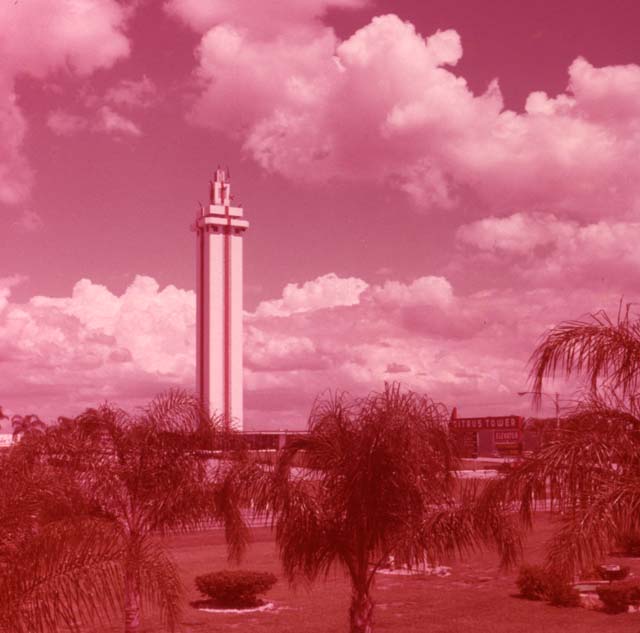
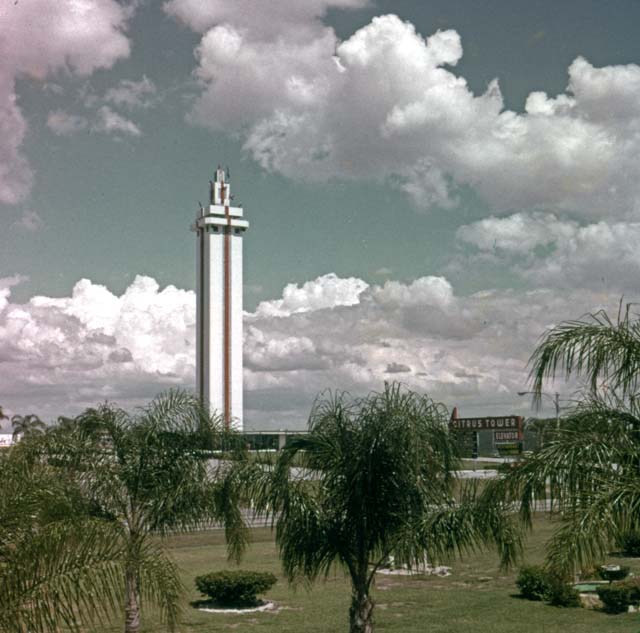
These first two are of the same slide of the Citrus Tower in Clermont, Florida. This is an old slide of my parent's from 1970.

Before: Color shifted red.

After: Color corrected as best I could. Looks good to me. A pro could do better, but I'm pleased.

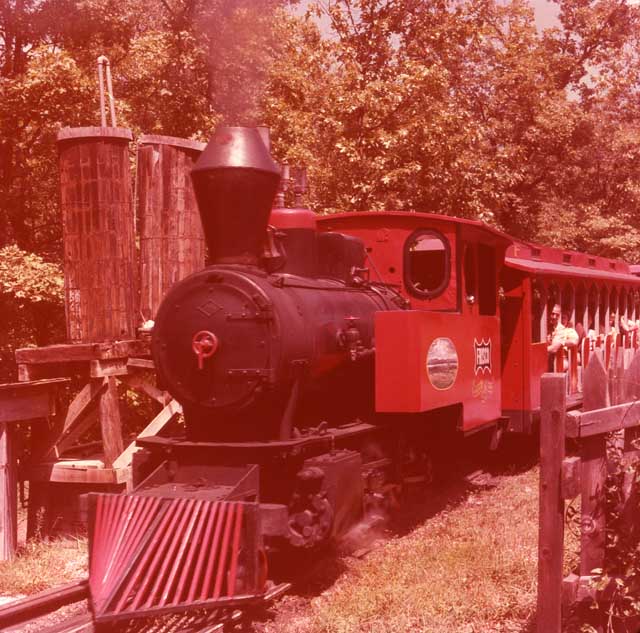
Before: Train ride at Silver Dollar City, Branson, MO, 1974. Also color shifted red, but not as bad as the one above.

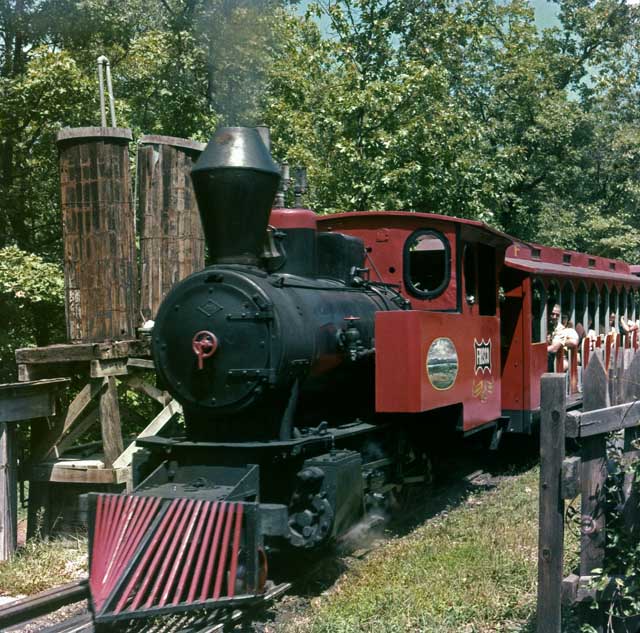
After: Lookin' really good.

This final one is just an after. I didn't keep a before scan of this one. I'm including this one because it's original slide that my Father In Law took around 1961 was just faded. Slowly losing all color, not color shifted like the two above. It isn't faded too badly, so with Photoshop Elements 4, I was able to make it look as if it was taken yesterday.

That's Lovely Wife on the far right, the little girl being held by her mother.

This is fun.

Wednesday, August 1, 2007

Recycle; I Have To

We're having our home's innards repainted. Right now, my brand spanking new Dell desktop with Core 2 Duo, 2GB RAM, 20in wide screen flat panel high resolution monitor is unplugged and set aside so the professionals can paint in that area of the house. It's like having your Porsche sitting there out of gas, and it'll be a couple of days before you can get more.

That means I can't get to all of my photos and use Elements to get them ready for the blog. So today y'all are getting a recycled blog post from my main blog, Least Significant Bits. This was a post about using Photoshop Elements to touch up scanned photographs from my family's past.

I'll get back to posting some new stuff when I get my computer back.

The following post is from January of 2007.

I'm the six year old blond kid in the white T-shirt in the photos at the bottom of the post.


What Fun!

I've posted about a zillion pictures on this blog.

And I've talked about the old family photos I scanned on our trip to Louisiana right after Christmas.

And I've talked about how fun it is to manipulate photos, to correct them and whatnot, using Photoshop Elements.

The photos of my Dad in the Navy, that I posted yesterday, took a good bit of work to correct. They aren't perfect, but one was torn, and they just weren't in good shape.

But the difference of the photos from before and after has me totally hooked on the process of making them better.

For me, this is like having a new color photography darkroom. Only without the mess and chemicals.

The pics of my Dad from yesterday took a while to work on, but the difference from what they were as originally scanned is quite dramatic. It's fun, and the final output makes the whole process worthwhile.

In fact, it's quite addictive.

And the really fun photos to work with, are the old ones that are basically in good shape physically, but have shifted colors over the years. These photos only take about 5 or 6 different steps to make vast improvements in them.

Plus, if there isn't much to repair, like scratches, or marks, or tears, each photo only takes 2 or 3 minutes to generate a totally shocking change.

So today, I'm gonna leave you with two before-and-after photos from my childhood, that literally only took about 5 minutes to repair them both. So when a photo is in decent shape, just color shifted, the rejuvenation is quick as it is dramatic.